Attached and embedded files are stored independently instead of being buried inside one unmanageable multi-gigabyte mailbox. I can find, copy, open or remove large and obsolete files directly.

Free · Open source · Windows
Email that stays
out of your way.
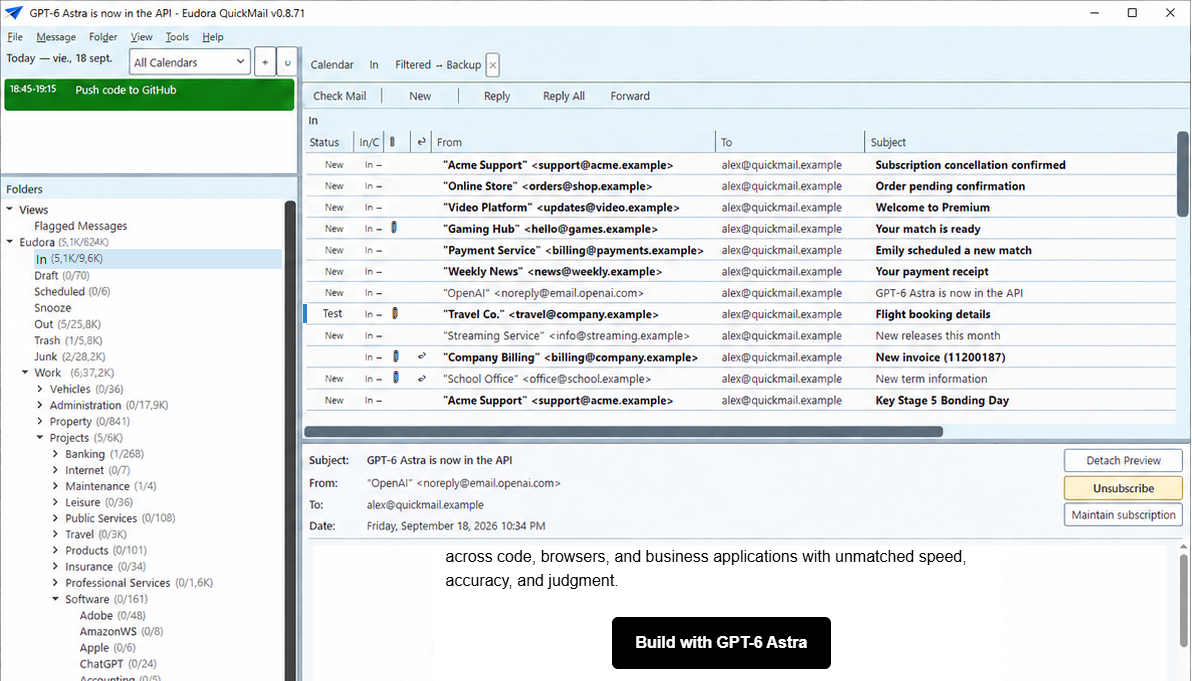
Eudora QuickMail is a local-first, keyboard-driven desktop email client built for speed, control and serious mail archives.
Credentials are protected by Windows Credential Manager.
Why I built QuickMail
Since 1998
Almost three decades of living in email.
I have used Eudora Mail every day since 1998—almost 30 years of very intensive use. It is now technologically obsolete and has important limitations, including poor support for UTF-8 messages, but a handful of exceptionally thoughtful ideas have kept me attached to it.
My inbox has always represented work still to be done. Once handled, a message belongs in its proper folder—such as Suppliers / Amazon. In Eudora, Ctrl+J applies the right filter and files it instantly, making a demanding daily workflow remarkably fluid.
With its X1-powered search, Eudora can find messages across hundreds of thousands of emails almost immediately. When you search many times every day, that immediacy changes everything.
I manage six email accounts; the last thing I want is six separate inboxes. Eudora brings them into one folder tree, while IMAP support adds external accounts such as Gmail alongside a largely POP3 archive.
A wealth of practical features and keyboard shortcuts turns repetitive mail handling into a fast, focused process.
Over the years I tried Outlook, Thunderbird, Eudora SE and other clients in search of those strengths in a living, modern product. None matched the complete workflow I relied on. In my experience, The Bat! came closest to Eudora’s power, but its search was too slow for the way I work.
More recently, I found an open-source GitHub project called Quick Mail. With that project as a foundation—and with invaluable help from Codex—I began evolving it around the Eudora capabilities that matter most to me. The result includes near-instant search, full-text search inside attachments, two-way IMAP integration, Google Calendar integration and many more tools designed to keep mail moving efficiently.
QuickMail also includes a dedicated Eudora importer, so members of that irreducible group who still use Eudora can try it with very little effort. Importing from other clients is not included yet because some formats are considerably more complex, but I am open to adding more importers where there is a real need.
A living work in progress
I use Eudora QuickMail every day. That has helped me add genuinely useful features and correct the shortcomings I encounter—but I do not want to pretend it is finished. At roughly 161,000 lines of code, there may still be things that do not behave as they should. This is an active project, and you are welcome to become part of it.
Why “Eudora QuickMail”? Eudora is a name I have grown genuinely fond of after so many hours together. QuickMail honours the original GitHub project from which this work grew—and describes what I want the new project to be: a remarkably fast and efficient way to manage email.
Questions, ideas or feedback? info@dinamica.tech
Modern email tools should help you think, not compete for your attention.
Complete feature set
Everything in one calm workspace.
QuickMail combines modern account support with the local control, density and keyboard efficiency that power users expect.
Mail, brought together
A single, responsive workspace for the accounts and archives you already use.
- Multiple IMAP, SMTP and POP3 accounts
- Unified inbox and combined views
- Conversation threading across folders
- Background sync with pooled connections
- Shared mailboxes and account health overview
- Safe move, copy, archive, delete and restore workflows
Find anything quickly
Local indexing and flexible search make even very large archives manageable.
- Fast full-text search across local mail
- Powerful field, date and attachment filters
- Saved views and per-folder view settings
- Virtual folders and recursive folder searches
- Attachment indexing and orphan-file cleanup
- Responsive progress for long-running operations
Write with confidence
A capable editor for everyday replies and carefully formatted messages alike.
- Rich HTML and plain-text composition
- Reply, reply all, forward and templates
- Draft autosave and recovery
- Send later, scheduled delivery and Undo Send
- Attachment reminder before sending
- English, Spanish and Catalan spelling
- Optional local grammar and translation tools
Calendar in context
Plan work without leaving the application that holds the conversation.
- Local calendars and Google Calendar integration
- Day, week and month views
- Create, edit, duplicate, share and delete events
- Today agenda with calendar filtering
- ICS invitation detection and RSVP controls
- Add standalone calendar invitations from email
People and organization
Keep the people you write to close at hand and automate repetitive filing.
- Local address book, groups and fast filtering
- Optional Google and Microsoft contact sync
- iCloud contact and calendar support
- Rules with real-message preview
- Stable folder targets through rename and move
- Recipient discovery from existing mail
Accessible and keyboard-first
Designed for efficient navigation and a predictable Windows experience.
- Full pane navigation from the keyboard
- Customizable shortcuts and command palette
- Screen-reader labels and focus feedback
- High-contrast friendly themed controls
- Clear status, progress and error messages
- Reader mode for complex email layouts
Made for continuity
Bring your Eudora history forward.
QuickMail includes a dedicated migration path for classic Eudora mailboxes, folders, messages and attachments. Large archives are processed with visible progress, recovery safeguards and a local data model designed to preserve message identity.
Guided archive import Folder and message preservation SQLite-backed local storage No Dinámica Ingeniería cloud account required
Privacy and security
Connected when you choose. Local by default.
QuickMail connects directly to the mail, calendar and contact providers you configure. Passwords are kept in Windows Credential Manager; Google OAuth tokens are protected with Windows security. Email HTML is rendered with scripts disabled and a strict content security policy.
Google access is optional and used only for the features you enable: Gmail mail access, Google Calendar, and optional read-only contact synchronization. See exactly how data is handled in our Privacy Policy.
System requirements
Built for Windows.
- Operating systemWindows 10 or Windows 11, 64-bit
- RuntimeSelf-contained release; WebView2 is normally included with Windows 11
- LicenseFree and open source under the MIT License